Dispensary marketing in 2026 runs on local search. Most big ad platforms still won’t run ads for THC products in the US, so customers have to find you through Google Maps, review sites, cannabis directories and your own website. The good news is that local SEO is mostly free. It rewards shops that keep their information accurate, answer reviews and post useful updates.
This playbook is for dispensary owners and marketers in legal US and Canadian markets. It covers paid ads, Google Business Profile, consistent listings, reviews, menus and photos, email and SMS basics, and directories. It ends with a 30-day action plan you can hand to your team.
One note before you start: cannabis advertising rules are set by states, provinces and the platforms, and they change often. Use this as a practical starting point. Then check your regulator’s rules and talk to a lawyer before launching any campaign.
Key takeaways
- Google Ads and Meta still block ads that promote THC products in the US, so paid search and social can’t carry your marketing.
- Your Google Business Profile is your most valuable free listing. Complete every field and keep it active.
- Reviews carry huge weight with local shoppers. Ask every customer, never pay for reviews, and reply to all of them.
- Keep your business name, address, phone and hours identical on your site, Google, Apple Maps and every directory.
- Email and SMS need opt-in consent, age checks and careful wording, and advertising rules differ by state and province.
Why dispensaries can’t rely on paid ads
Most retailers can switch on Google or Facebook ads and get traffic the same day. Cannabis businesses mostly can’t. Here is where things stand as of October 2026.
Google Ads
Google’s dangerous products policy bans ads for “substances that alter mental state for the purpose of recreation.” The one carve-out in the US is for topical hemp-derived CBD with 0.3% THC or less. Advertisers must apply for it, and it is limited to California, Colorado and Puerto Rico.
In Canada, Google is running a limited pilot that lets some licensed cannabis businesses show product ads on Search only. It began August 25, 2025 and runs through December 31, 2026. In 2026, Google widened eligibility to Health Canada license holders, provincial and territorial government operators, and authorized private retailers. If you’re a Canadian retailer, check whether your province’s rules allow you to take part.
Meta (Facebook and Instagram)
Meta still prohibits ads that promote THC or cannabis products with psychoactive components. In 2023 it loosened rules for hemp and CBD. Hemp products without CBD and with no more than 0.3% THC can be advertised in the US, Canada and Mexico. CBD products need LegitScript certification plus written permission from Meta. Organic posts are allowed, but accounts that look like they are selling THC can be restricted or removed.
What this means for you
Paid platforms are a narrow channel at best. Your budget usually goes further on what you control: listings, reviews, your website and your customer list. Cannabis-specific ad networks and directories do accept dispensary ads, but each state sets its own advertising rules.
| Channel | Can US dispensaries promote THC products? | Best use |
|---|---|---|
| Google Ads | No (topical hemp CBD only, in 3 places) | Not a main channel in the US |
| Google Business Profile | Yes, as a free business listing | Maps visibility, hours, reviews, posts |
| Meta ads | No | Organic posts only, with care |
| Cannabis directories | Yes, within state rules | Menus, deals, “near me” shoppers |
| Yes, with opt-in and age checks | Repeat visits, new drops, events | |
| SMS | Often restricted by providers | Only through a cannabis-approved provider |
Local SEO for dispensaries: set up your Google Business Profile
Google explains that local results are based on three things: relevance (how well your profile matches a search), distance (how close you are) and prominence (how well-known you are, including reviews and links). You can’t pay for better local ranking. You can make your profile complete and active, though.
Google says people are 2.7 times more likely to see a business with a complete profile as reputable, and 70% more likely to visit it.
Profile checklist
- Name: use your real business name as it appears on your storefront and license. Don’t add keywords like “best weed near me.” That breaks Google’s guidelines and can get your profile suspended.
- Category: pick the most specific primary category that matches your business (type “cannabis” in the category field to see the options in your area), and add secondary categories only if they truly apply.
- Hours: keep regular hours current and add special hours for holidays and 4/20 week.
- Attributes: fill in what applies, such as wheelchair access, parking, in-store pickup or delivery.
- Website link: point to your location page or menu, not just your homepage.
- Description: two or three factual sentences about what you carry, your services and your neighborhood. Include an age reminder.
- Posts and Q&A: share events, new arrivals and parking tips. Keep posts factual and skip health claims.
If a post or product listing gets rejected, rewrite it to focus on store info, like hours, events and services, rather than product promotion.
Keep your name, address and phone the same everywhere
Search engines and map apps cross-check your details across the web. If one directory says “Green Leaf Co.” and another says “GreenLeaf Dispensary” with an old phone number, they can’t tell which is right. Shoppers who call a dead number tend to leave angry reviews.
Pick one official version of your name, address and phone number (often called NAP) and use it word for word on:
- Your website footer and location page
- Google Business Profile, Apple Business Connect and Bing Places
- Cannabis directories and menu platforms
- Yelp, Facebook, Instagram bio and any local chamber or tourism listings
Keep a spreadsheet of every place your business appears, with a login and “last checked” date. Review it quarterly and whenever you move or change your phone number. Apple Maps is worth the effort: in BrightLocal’s 2026 survey, the share of consumers who used it for local reviews rose from 14% to 27%.
Reviews: the signal shoppers trust most
BrightLocal’s Local Consumer Review Survey 2026 polled 1,002 US adults. Its results show how much reviews weigh on local buying decisions.
The same survey found that 68% of consumers need a rating of four stars or higher, and 31% will only use a business rated 4.5 or above. Generative AI is also growing fast: 45% said they had used tools like ChatGPT for local recommendations, up from 6% the year before.
How to earn reviews the right way
- Ask everyone, not just happy customers. Google bans “review gating,” which means asking only customers you expect to be satisfied.
- Never pay or discount for reviews. Google removes reviews posted because of an incentive. The FTC’s rule on consumer reviews, announced in August 2024, bans buying fake reviews and offering rewards tied to positive (or negative) reviews.
- Don’t pressure people at the counter or let staff review their own store. Google’s content policy bans both.
- Make it easy: a short link or QR code on receipts and bag stuffers, plus a friendly line in your post-purchase email.
How to respond
BrightLocal found that 80% of consumers are more likely to use a business that responds to all its reviews. Half are put off by templated replies. Mention something specific and keep replies short. For negative reviews, apologize for the experience, take details offline and follow up. Never confirm someone was a customer in a way that shares private information. Don’t make product promises or health claims in replies either.
Menus, photos and your website
A shopper who finds you on Maps wants to know: are you open, do you have what I want, and what does it cost? Your menu and photos answer that faster than any slogan.
Menus
- Sync your live menu to your website and directory listings so stock and prices match. Out-of-date menus are a common source of bad reviews.
- Use real product names, sizes, prices and lab-tested THC/CBD percentages as reported on the label. Link strain names to neutral info pages, like the WhereLeaf strain library, for shoppers who want background.
- Describe products only by type, flavor, aroma and commonly reported experiences. Never describe them as helping with any condition.
Photos
- Upload clear storefront photos from the street, so first-time visitors recognize the building.
- Add photos of the entrance, parking, checkout area and staff (with their permission).
- Follow your state’s rules on product imagery. Avoid cartoons, bright candy-like styling or anything that might appeal to kids. Never show people consuming.
Your website
Give each store its own location page with the exact NAP, hours, a map, parking tips, payment options and a link to the menu. Add an age gate where your state requires one. Short pages answering common questions, like what to bring on a first visit, help both shoppers and search engines.
Email and SMS compliance basics
Your customer list is a channel no platform can shut off, but it comes with rules. This section is general information, not legal advice. Cannabis marketing rules differ by state and province, so check yours and get a lawyer’s review.
In the US, the federal CAN-SPAM Act applies to commercial email. The FTC’s guide lists the core rules:
- Honest “From” names and subject lines.
- A clear statement that the message is an ad.
- A valid physical mailing address.
- A working unsubscribe link, with opt-outs honored within 10 business days.
Penalties can reach $53,088 per violating email. On top of that, only send to people who opted in, confirm they meet your market’s legal age at sign-up, and follow your state’s content rules for cannabis advertising.
SMS
Text marketing is riskier. Federal telemarketing rules generally require clear written consent before you send marketing texts. Carriers and SMS platforms also screen content. Some mainstream providers, SimpleTexting for example, say they prohibit messages that mention cannabis at all. Before building a text list, confirm in writing that your provider supports licensed cannabis retailers in your state, keep messages factual, include opt-out instructions and keep records of consent.
Canada
Canada’s Cannabis Act generally bans cannabis promotion except for informational and brand-preference promotion sent to identified adults, or placed where young people aren’t allowed. Testimonials, lifestyle imagery and anything that could appeal to young people are prohibited. Retailers face added provincial rules, and Canada’s anti-spam law (CASL) covers email and texts.
Directory listings, including WhereLeaf
Cannabis directories reach people who are already looking for a dispensary. A complete listing adds another accurate copy of your NAP, a place for reviews and a link back to your site.
When you set up any directory listing:
- Claim the listing so you control it. Don’t leave an unverified copy floating around.
- Use your exact NAP and license number where the site asks for it.
- Add hours, services (pickup, delivery, accessibility), photos and a menu link or feed.
- Write a factual description without health claims.
- Check it monthly and after any change in hours or menu.
On WhereLeaf, licensed dispensaries, delivery services and suppliers can add a listing so shoppers using our dispensary finder can see your location, hours and services. If you want more visibility, compare the options on our packages page. Suppliers and brands can also appear in the supplier directory, which helps retailers find them.
Your 30-day local SEO action plan
Here is a week-by-week plan for a single-location dispensary. Multi-location operators can repeat it per store.
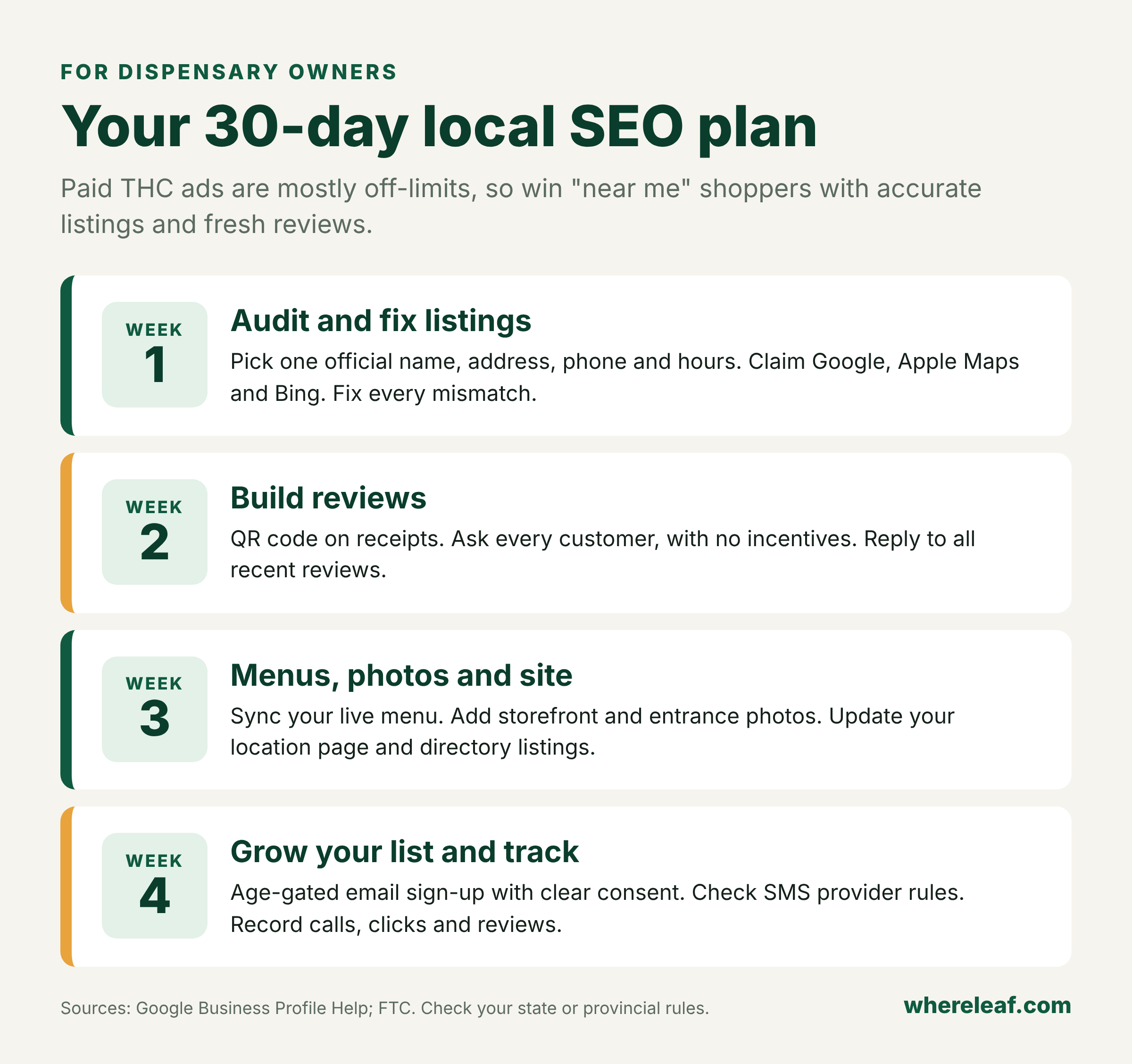
Week 1: Audit and fix
- Choose your official name, address, phone and hours.
- Claim or verify Google Business Profile, Apple Business Connect and Bing Places.
- List every directory and social profile in a spreadsheet and fix mismatches.
- Pick the right primary category and complete every attribute that applies.
Week 2: Reviews
- Create a short review link and QR code. Put it on receipts and bag inserts.
- Train staff to ask every customer, with no pressure and no incentives.
- Reply to every review from the last three months, good or bad.
- Set a rule for response time, such as within two business days.
Week 3: Menus, photos and site
- Connect your live menu to your website and directory listings.
- Upload fresh storefront, entrance and interior photos.
- Build or update your location page with NAP, map, hours and parking.
- Claim or update directory listings, including your WhereLeaf listing.
Week 4: List and track
- Set up an email sign-up form with age confirmation and clear consent.
- Confirm your SMS provider allows cannabis before you collect phone numbers.
- Post a Google Business Profile update about hours, events or new arrivals.
- Record starting numbers: profile calls, direction requests, website clicks, review count and average rating. Compare them monthly.
Still planning your store? See dispensary license costs by state for 2026 fees, and use our budtender interview questions to hire staff who can answer shoppers well.
Frequently asked questions
Can dispensaries run Google Ads in 2026?
Not for THC products in the US. As of October 2026, Google allows only topical hemp-derived CBD ads (0.3% THC or less) in California, Colorado and Puerto Rico, after an application. A limited Search pilot for licensed cannabis businesses runs in Canada through December 31, 2026.
Can I advertise my dispensary on Facebook or Instagram?
Meta does not allow ads that promote THC or psychoactive cannabis products. You can post organic content, but keep it factual and age-appropriate and avoid anything that looks like a direct sale.
Is it legal to offer a discount for a Google review?
No. Google removes reviews posted because of incentives. The FTC’s 2024 consumer review rule bans rewards tied to the sentiment of a review, as well as fake or purchased reviews. Ask every customer for honest feedback instead.
How many reviews does a dispensary need?
There is no magic number. Volume, recency and rating all count, and BrightLocal found that 68% of consumers want at least a four-star rating. A steady flow of recent, honest reviews beats a one-time burst, which can also look suspicious to Google.
Can I send text messages to dispensary customers?
Sometimes, but it is tricky. You generally need prior written consent, and many SMS platforms restrict cannabis content. Use a provider that confirms in writing that it supports licensed cannabis retailers, and check your state’s rules.
Sources
- Google Ads Help: Dangerous products or services (2026)
- Google Ads Help: Updated Cannabis-Related Content Policy (March 2026)
- Google Ads Help: Updated Cannabis-Related Content Policy (August 2025)
- Social Media Today: Meta Updates Its Ad Policies for Cannabis-Related Products (2023)
- Meta Transparency Center: Drugs and Pharmaceuticals ad standards (2026)
- Google Business Profile Help: Tips to improve your local ranking on Google (2026)
- Google Business Profile Help: Complete your Business Profile (2026)
- BrightLocal: Local Consumer Review Survey 2026 (2026)
- Google Maps User Contributed Content Policy: Fake engagement (2026)
- Federal Trade Commission: FTC Announces Final Rule Banning Fake Reviews and Testimonials (2024)
- Federal Trade Commission: CAN-SPAM Act: A Compliance Guide for Business (2026)
- SimpleTexting: Prohibited content in SMS marketing (2024)
- Health Canada: Promotion of cannabis: Prohibitions and permissions in the Cannabis Act and Regulations (2026)
Last updated: October 2026. Laws and prices change; always check your state or provincial regulator.